
 Education
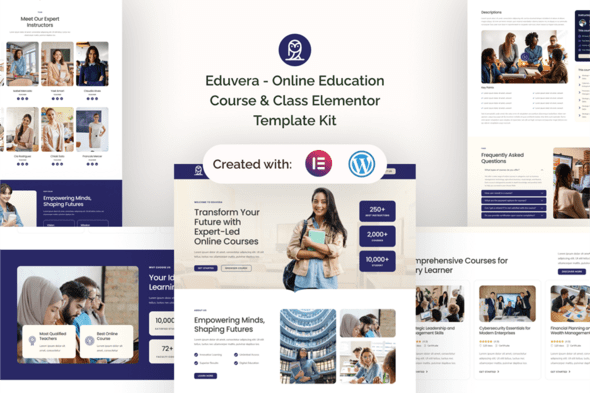
Eduvera – Online Education Course & Class Elementor Template Kit
1 Year
Updates
Introducing Eduvera a comprehensive template kit meticulously crafted for online education courses and classes, exclusively for WordPress. Designed with precision and leveraging free plugins, Eduvera empowers educational professionals to establish a compelling online presence without the need for intricate development. Tailored specifically for online schools, e-learning platforms, and educational institutions.
Note: Eduvera is not your typical WordPress theme. It’s a comprehensive template kit that provides all the necessary page content for the Elementor page builder, offering users the flexibility to design without constraints. While optimized for use with the free Hello Elementor theme, Eduvera seamlessly integrates with most themes that support Elementor.
Suitable For:
- Online Schools
- E-Learning Platforms
- Educational Institutions
Features:
- Using Free Elementor (Elementor Pro is not required)
- Unique & Clean Design
- Modern Design
- Build With Container
- 15 Ready to Use Pages
- Unlimited colors
- More than 900 Ready Fonts
- Fully Responsive Layout
- Fully Customizable Cross Browser Compatibility: Chrome, Firefox, Safari, Opera
Templates Included:
- Global Theme Style
- Home
- About
- Courses
- Courses Detail
- Teacher
- Career
- Pricing
- FAQ
- Testimonial
- Error 404
- Blog Post
- Single Post
- Contact Us
- Header
- Footer
Required Plugin:
- Elementor
- ElementsKit Lite
- MetForm
- Gum Elementor Addon
- Elementor Header & Footer Builder
How To Install:
- Install and Activate the “Envato Elements” plugin from Plugins > Add New in WordPress.
- Download your kit file and Do not unzip.
- Go to Elements > Installed Kits and click the Upload Template Kit button. You may also import automatically by clicking Connect Account to link your Elements subscription, then import under Elements > Template Kits.
- Check for the orange banner at the top and click Install Requirements to load any plugins the kit uses.
- Click import on the Global Kit Styles first.
- Click Import on one template at a time. These are stored in Elementor under Templates > Saved Templates.
- Go to Pages and create a new page and click Edit with Elementor.
- Click the gear icon at lower-left of the builder to view page settings and choose Elementor Full Width and hide page title.
- Click the gray folder icon to access My Templates tab and then Import the page you’d like to customize.
This Template Kit uses demo images from Envato Elements. You will need to license these images from Envato Elements to:
Frequently Asked Questions
Review the listed version, filename and any file-verification details provided before installing the file.
When a newer file is available, you can download it from your account during your access period. Check the version shown on the product page.
GPL-covered code can generally be used on multiple sites. Check separately licensed images, other assets and vendor services before use.
Check the license terms that apply to each product. WPTemplateKit is an independent redistribution service and does not include an official developer license or support.
Related Products


Wait! Become a member and download it all
Instead of paying 3.99 € for just this file, join the Club and download it — plus the entire catalog — with unlimited downloads while your membership is active.
Or try everything first with the 24-Hour Pass — 4.99 €
Special for you
Still thinking it over?
Take the 24-Hour Pass and try everything for just 4.99 €: this file and the entire catalog, with full member access for 24 hours. One-time payment — no subscription, nothing to cancel.
Try 24 hours for 4.99 €