
 Education
Recode – Coding Bootcamp Elementor Template Kit
1 Year
Updates
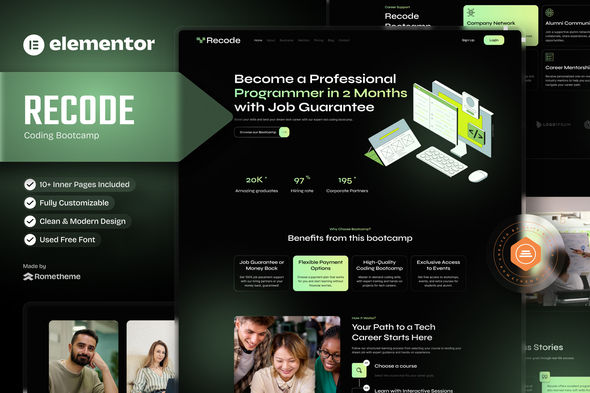
Recode is a simple and powerful Elementor Template Kit made just for the Coding Bootcamp Company. It’s built using Elementor Page Builder, which makes it super easy to customize your website without any coding skills. With its modern design, fast performance, and easy setup, you can create a professional and fully functional website in no time!
We understand the importance of performance and speed for your website. That’s why we’ve included the exclusive RomethemeKit Plugin, an all-in-one solution that eliminates the need for multiple plugins. This plugin provides everything you need in one place, including a theme builder, advanced widgets, premium icons, and a form builder, ensuring your website remains fast, efficient, and easy to manage—all while offering amazing features.
The Recode package includes an impressive collection of 16+ total pages with ready-to-use designs, allowing users to quickly launch their websites with minimal effort. Key benefits of the template include a fully responsive layout, easy customization, and a professional design recode to the Coding Bootcamp, Web Development Training, Programming Courses, Tech Education, Full-stack Development, Career-focused Learning, Developer Portfolio, and Online Coding Academy. Whether you’re starting fresh or upgrading your online presence, this template has everything you need to get started!
Key Features:
- Exclusive with RomethemeKit Plugin: Access theme builder, Premium icons, advanced widgets, and form builder to simplify your website creation.
- Performance-Focused: Minimal plugin usage for optimal website speed.
- 16+ Premium Pre-Designed Templates: Professional aesthetics to enhance your brand’s credibility.
- Free Plugin, No Elementor PRO Needed: All features are included without requiring Elementor PRO.
- Responsive Design: Optimized for desktops, tablets, and mobile devices.
- Fully Customizable with Elementor: Modify every element of your site using Elementor’s drag-and-drop editor, no coding required.
- Easy to Customize: Effortlessly personalize with detailed documentation and step-by-step video tutorials.
- Comprehensive Documentation: Detailed setup guide for quick and easy installation.
- Lifetime Updates and 24/7 Support: We provide free lifetime updates and round-the-clock support to ensure your site stays compatible, secure, and functional.
Why Choose Us?
- Professional Design: Tailored to reflect trust and the quality of your Coding Bootcamp Company.
- High Performance: Minimal plugins for fast and efficient website operation.
- Lifetime Commitment: Free lifetime updates to ensure your template remains cutting-edge.
- Unlimited Flexibility: Customize every element effortlessly with the RomethemeKit Plugin.
- User-Friendly: Perfect for beginners and experienced users alike.
Suitable For: This template is perfect for businesses looking to establish a professional online presence, such as: *StartUp Company. *Web Development & Programming Course. *Tech Education Company. *Developer & Coding Bootcamp
Templates Included: This kit provides everything you need: Pages:
- Homepage
- About Us
- About Us
- Bootcamps
- Bootcamp Details
- Services
- Our Team
- Pricing Plan
- FAQs
- 404 Page
- Blog & News
- Single Post
- Contact Us
Headers and Footers included: Powered by RomethemeKit Plugin.
- Header
- Footer
Bonus Blocks:
- Block – Contact Form
Plugins installed with kit:
- RomethemeKit for Elementor Plugin
- RomethemeForm Plugin
How to Use Template Kits: This is not a WordPress Theme. Template kits contain the design data for Elementor only and are installed using the envato Elements plugin for WordPress or directly through Elementor.
Elementor Template Kits use the Envato Elements plugin to install.
Detailed Guide:
For further support, go to Elementor > Get Help in WordPress menu.
Setup Global Header and Footer in RomethemeKit If you have Elementor Pro, headers and footers may be customized under Theme Builder.
- Go to Romethemekit > Theme builder > Header and click Add New
- Give it a title and select Header, click Condition tab and add Entire Site and click Save
- Click Edit with Elementor
- Click the gray folder icon to access My Templates tab and select the header template to import and Update.
- Repeat for Footer
How to Setup Forms If you have Elementor Pro, skip install of form plugin and form blocks.
- Import the form blocks.
- Click on RomethemeForm > Forms in the admin menu
- Click Add New
- Enter a Form Name and click Save and Edit (ignore other options)
- Click the gray folder icon in the builder area and click the My Templates tab
- Click Insert on the form block
- Click Publish/Update
- When customizing pages with forms, click the Rometheme Form Element and select the form from the drop-down
Images: This Template Kit uses demo images from Envato Elements. You will need to license these images from Envato Elements to use them on your website, or you can substitute them with your own. Blog Content is not included – you will need to add a few posts to WordPress before post content will appear in templates.
Frequently Asked Questions
Review the listed version, filename and any file-verification details provided before installing the file.
When a newer file is available, you can download it from your account during your access period. Check the version shown on the product page.
GPL-covered code can generally be used on multiple sites. Check separately licensed images, other assets and vendor services before use.
Check the license terms that apply to each product. WPTemplateKit is an independent redistribution service and does not include an official developer license or support.
Related Products

Wait! Become a member and download it all
Instead of paying 3.99 € for just this file, join the Club and download it — plus the entire catalog — with unlimited downloads while your membership is active.
Or try everything first with the 24-Hour Pass — 4.99 €
Special for you
Still thinking it over?
Take the 24-Hour Pass and try everything for just 4.99 €: this file and the entire catalog, with full member access for 24 hours. One-time payment — no subscription, nothing to cancel.
Try 24 hours for 4.99 €