
 Fashion Beauty
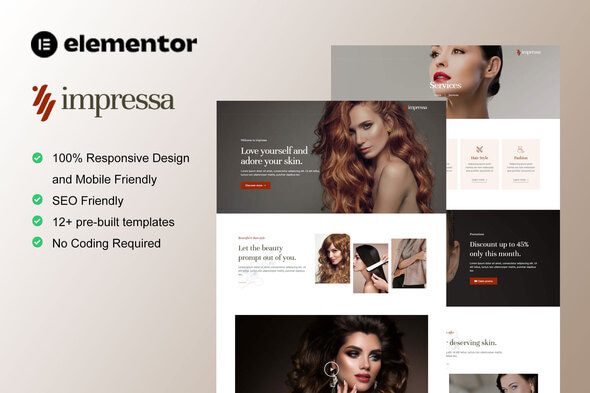
Impressa – Personal Stylist & Makeup Service Elementor Template Kit
1 Year
Updates
Impressa is Beautiful Elementor Template Kit for Personal Stylist and Make Up Service website. This template has clean, modern, simple and professional look. You can easily build modern website that offer professional service as personal stylist and makeup service, both personal and established agency. You can also use this elementor template kit for any related service such as hair stylist, fashion style, professional makeup service, daily makeup, event makeup, etc. You can also blogging about new trend of fashion style, make up trend, hair style trend while offering professional service. Just drag and drop, no coding required.
Layout Features :
- Modern and Professional design
- Built with Elementor Pro
- 100% Responsive & mobile-friendly
- 12+ pre-built templates
- Easy to customize
- Template kit built with Elementor Hello Theme
What’s Included in the Zip :
- Homepage
- About Us
- Contact Us
- FAQ
- Gallery
- Pricing Plan
- Services
- Single Service
- Team
Elementor Pro upgrade is required for some templates and features (not included)
- Global Style
- Header
- Footer
- Menu Slide
- Slide Menu
- Archive blog
- Error 404
- Single Post
Required plugins installed with kit:
- Element Pack Lite
- ElementsKit Lite
- Premium Addons
How to Use Template Kits:
- Install and Activate the “Envato Elements” plugin from Plugins > Add New in WordPress
- Download your kit file and Do not unzip
- Go to Elements > Installed Kits and click the Upload Template Kit button. You may also import automatically by clicking Connect Account to link your Elements subscription, then import under Elements > Template Kits.
- Check for the orange banner at the top and click Install Requirements to load any plugins the kit uses
- Click import on the Global Kit Styles first
- Click Import on one template at a time. These are stored in Elementor under Templates > Saved Templates.
- Go to Pages and create a new page and click Edit with Elementor
- Click the gear icon at lower-left of the builder to view page settings and choose Elementor Full Width and hide page title
- Click the gray folder icon to access My Templates tab and then Import the page you’d like to customize.
If you have Elementor Pro, headers and footers may be customized under Theme Builder.
Detailed Guide: https://help.market.envato.com/hc/en-us/articles/900000842846-How-to-use-the-Envato-Elements-WordPress-Plugin-v2-0
For further support, go to Elementor > Get Help in WordPress menu.
Configuring Header Popup
- Import the popup templates and the header
- Open the Side Menu popup template and select the menu toggle icon
- Click the wrench icon on the “Popup” setting in the link field and select the Slide Menu template to display, then save
- Once you have setup all your pages in WordPress, create your site menu in Appearance > Menus, then open Templates > Theme Builder > Slide Menu to select your menu. Repeat for the Header template if you want a menu to display across the top of the page also.
This Template Kit uses demo images from Envato Elements. You will need to license these images from Envato Elements to use them on your website, or you can substitute them with your own.
- https://elements.envato.com/image-C5NUYD9
- https://elements.envato.com/floral-wedding-collection-C9KR82F
- https://elements.envato.com/image-PMRLSZA
- https://elements.envato.com/image-7M6HP8T
- https://elements.envato.com/image-DTDT3ND
- https://elements.envato.com/image-PFXTMA2
- https://elements.envato.com/image-RJQT8L3
- https://elements.envato.com/image-PWGLXFY
- https://elements.envato.com/image-PPXECR2
- https://elements.envato.com/image-JVTQDAX
- https://elements.envato.com/image-VJN6U28
- https://elements.envato.com/image-Z9GZCFJ
- https://elements.envato.com/image-PXGBTQQ
- https://elements.envato.com/image-BQ56THJ
- https://elements.envato.com/image-KEDXH7A
- https://elements.envato.com/image-BLUW6KQ
- https://elements.envato.com/image-52K8CDR
- https://elements.envato.com/portrait-of-cheerful-european-female-with-satisfie-W73EUUE
- https://elements.envato.com/waist-up-shot-of-handsome-self-confident-cheerful–BUTM9PX
- https://elements.envato.com/optimistic-positive-handsome-bearded-man-FXXXGY4
- https://elements.envato.com/joyful-freckled-teenager-wears-round-transparent-g-EPRUCGN
- https://elements.envato.com/carefree-attractive-girl-with-pleasant-look-enjoys-4GXJZTE
- https://elements.envato.com/horizontal-shot-of-pleasant-looking-ginger-young-e-F9MBGAR
- https://elements.envato.com/happy-confident-male-entrepreneur-with-postive-smi-BDAU9DK
- https://elements.envato.com/pleased-cheerful-redhaired-male-with-pleasant-smil-CCXAYZL
- https://elements.envato.com/image-8TASP97
- https://elements.envato.com/image-AMFU6NV
- https://elements.envato.com/image-8QF2LTD
- https://elements.envato.com/image-X7WK2A3
- https://elements.envato.com/image-6AGRT9K
- https://elements.envato.com/image-5CWBNRA
Frequently Asked Questions
Review the listed version, filename and any file-verification details provided before installing the file.
When a newer file is available, you can download it from your account during your access period. Check the version shown on the product page.
GPL-covered code can generally be used on multiple sites. Check separately licensed images, other assets and vendor services before use.
Check the license terms that apply to each product. WPTemplateKit is an independent redistribution service and does not include an official developer license or support.
Related Products
Wait! Become a member and download it all
Instead of paying 3.99 € for just this file, join the Club and download it — plus the entire catalog — with unlimited downloads while your membership is active.
Or try everything first with the 24-Hour Pass — 4.99 €
Special for you
Still thinking it over?
Take the 24-Hour Pass and try everything for just 4.99 €: this file and the entire catalog, with full member access for 24 hours. One-time payment — no subscription, nothing to cancel.
Try 24 hours for 4.99 €