
 Food Drink
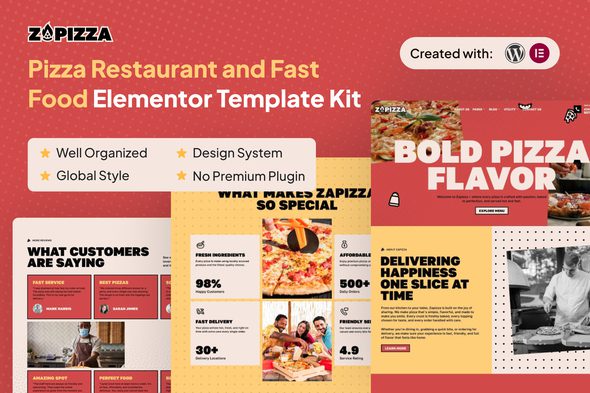
Zapizza – Pizza Restaurant and Fast Food Elementor Template Kit
1 Year
Updates
Introducing “Zapizza” – an Elementor Template Kit for elevating your online presence!
Crafted for modern pizza restaurants and fast food businesses, Zapizza is your go-to Elementor & WordPress template kit designed to captivate hungry customers and boost online sales. With 21+ professionally designed pages, this kit empowers you to launch a sleek, engaging website that highlights your menu, promotes special offers, and drives lead generation with ease. Whether you run a local pizzeria, a fast food chain, or a delivery-focused business, Zapizza ensures your digital storefront is as appetizing as your food.
Zapizza comes packed with features tailored to the fast-paced restaurant industry. Enjoy clean typography with optimal readability, layouts optimized for lead generation, and a design system that guarantees consistency across all pages. Navigation is effortless thanks to the one-click back-to-top button, while optimized breakpoints ensure a superior user experience across mobile, tablet, and desktop devices. Extensive testing across major browsers guarantees smooth performance, while full customization options allow you to adapt the kit to your brand identity with minimal effort.
Unlock the potential of your restaurant’s online presence with Zapizza’s comprehensive suite of 21+ templates. From menu showcases and promotional landing pages to contact forms and delivery service integrations, every page is crafted to maximize conversions and customer engagement. Zapizza helps you streamline your website development process, saving time while delivering a polished, professional look that reflects the quality of your food and service. With Zapizza, your restaurant can stand out in the competitive fast food market and attract more customers online.
Take your pizza restaurant or fast food business to the next level with Zapizza – where functionality meets flavor, and design meets deliciousness.
Suitable For:
- Fast food chains
- Food delivery services
- Franchise-based fast food outlets
Features:
- Unique & Clean Design
- Modern design based on design system
- 21+ Ready to use pages
- Unlimited colors
- More than 900 ready fonts
- Fully Responsive Layout
- Fully Customizable
- Click to Go To Top
- Cross Browser Compatibility: Chrome, Firefox, Safari, Opera
Templates Include:
- Global Theme Style
- Design Guideline
- Homepage
- About Us
- Franchise Form
- Franchise
- Review Form
- Subscribe Form
- Contact Form
- Contact Us
- Coming Soon
- 404
- Single Post
- Our Blog
- Locations
- FAQ
- Catering
- Online Book
- Career
- Reviews
- Our Team
- Menus
- Online Book Form
- Footer
- Header
Required Plugin(included):
- Elementor
- ElementsKit Lite
- Gum Elementor Kit
- Metform
How to Use Template Kits:
This is not a WordPress Theme. Template kits contain the design data for Elementor only and are installed using the envato Template Kit Import plugin for WordPress or directly through Elementor.
Detailed Guide:
For further support, go to Elementor > Get Help in WordPress menu.
How to Import MetForm Custom Form:
- While edititing a page where a form should appear, open the Elementor navigator to locate the Metform widget.
- Click Edit Form in the builder panel.
- Select New, leave blank selected then click Edit Form button.
- Click ‘Add Template’ grey folder button.
- Click ‘My Templates’ tab.
- Choose your imported MetForm template, then click ‘Insert’.
- Once the template is loaded, click ‘Update’.
Setup Header in ElementsKit Lite If you have Elementor Pro, setup headers and footers in Theme Builder. Pages you create with Elementor must have the Page Layout set to Elementor Full width for the global header and footer to appear.
- Go to ElementsKit > Header Footer
- If prompted to go through the wizard, click Next all the way through and then return to step 1 (you are not required to enter your email address or share your information)
- Click Add New Template button at the top
- Name your template, then toggle “Activate/Deactivate:” to On
- Click the gray Edit Content button. Elementor will open.
- Click the gray folder icon to access My Templates tab and Insert the header or footer template.
- Customize and Publish
IMPORTANT:
This Template Kit uses demo images from Envato Elements. You will need to license these images from Envato Elements to use them on your website, or you can substitute them with your own.
Frequently Asked Questions
Review the listed version, filename and any file-verification details provided before installing the file.
When a newer file is available, you can download it from your account during your access period. Check the version shown on the product page.
GPL-covered code can generally be used on multiple sites. Check separately licensed images, other assets and vendor services before use.
Check the license terms that apply to each product. WPTemplateKit is an independent redistribution service and does not include an official developer license or support.
Related Products
Wait! Become a member and download it all
Instead of paying 3.99 € for just this file, join the Club and download it — plus the entire catalog — with unlimited downloads while your membership is active.
Or try everything first with the 24-Hour Pass — 4.99 €
Special for you
Still thinking it over?
Take the 24-Hour Pass and try everything for just 4.99 €: this file and the entire catalog, with full member access for 24 hours. One-time payment — no subscription, nothing to cancel.
Try 24 hours for 4.99 €