
 Real Estate Construction
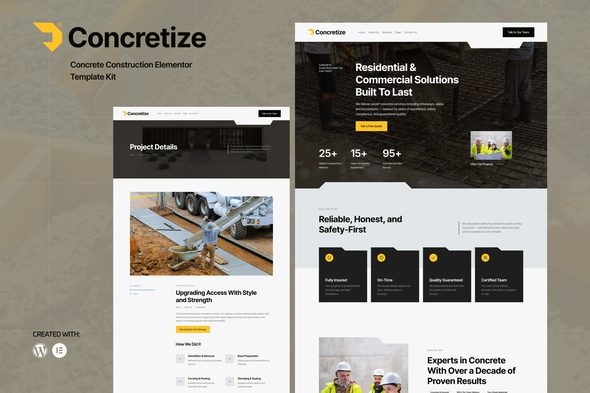
Concretize – Concrete Construction Elementor Template Kit
1 Year
Updates
Concretize – Concrete Construction Elementor Template Kit
Concretize is a bold and modern Elementor Template Kit designed for concrete, construction, and industrial service companies. Built to help contractors and builders create a professional, high-impact website with ease.
Concretize is a modern and professional Elementor Template Kit designed specifically for concrete, construction, and industrial service businesses. Whether you’re offering concrete paving, foundation work, or general contracting, this kit provides all the essential layouts to create a powerful online presence with no coding required.
Built with Elementor and compatible with most themes, Concretize is fully responsive, fast-loading, and SEO-optimized. It’s ideal for construction companies, building contractors, and industrial service providers who want to showcase their services, projects, and team in a structured and professional layout.
Features:
- Fully Responsive & Mobile-Friendly
- Clean & Bold Design for Construction Niche
- 100% Customizable with Elementor
- SEO-Optimized for Better Visibility
- Integrated MetForm for Lead Generation
- Includes Header, Footer & 404 Page Templates
- Global Theme Style for Design Consistency
Templates Include:
- Global Theme Style
- Home
- About Us
- Services
- Service Details
- Projects
- Project Details
- Team
- Pricing
- Faqs
- Blog
- Single Post
- Contact Us
- 404 Page
- Subscribe MetForm
- Contact MetForm
Required Plugins:
- Elementor
- Jeg Elementor Kit
- MetForm
How to Use Template Kits:
This is not a WordPress theme. Template kits contain the design data for Elementor only and are installed using the Envato Elements plugin for WordPress or directly through Elementor.
Guides:
How to Import MetForms:
- Import the MetForm block templates
- Import the page where the form appears and enable the Navigator (right-click)
- Select the MetForm widget > Edit Form > New > Edit Form
- Click the gray folder icon, go to “My Templates”
- Select the MetForm you imported, click Insert
- Customize the form and click “Update & Close”
- Click Update on the page
How to Set Up Header with Jeg Elementor Kit:
- Go to Jeg Elementor Kit > Header Template
- Click “Add New Header”
- Set Display Condition: Entire Site
- Insert the header template from My Templates
- Customize and Save
Image License:
This Template Kit uses demo images from Envato Elements. You’ll need to license these images directly from Envato Elements or replace them with your own.
Frequently Asked Questions
Review the listed version, filename and any file-verification details provided before installing the file.
When a newer file is available, you can download it from your account during your access period. Check the version shown on the product page.
GPL-covered code can generally be used on multiple sites. Check separately licensed images, other assets and vendor services before use.
Check the license terms that apply to each product. WPTemplateKit is an independent redistribution service and does not include an official developer license or support.
Related Products


Wait! Become a member and download it all
Instead of paying 3.99 € for just this file, join the Club and download it — plus the entire catalog — with unlimited downloads while your membership is active.
Or try everything first with the 24-Hour Pass — 4.99 €
Special for you
Still thinking it over?
Take the 24-Hour Pass and try everything for just 4.99 €: this file and the entire catalog, with full member access for 24 hours. One-time payment — no subscription, nothing to cancel.
Try 24 hours for 4.99 €