
 Business Services
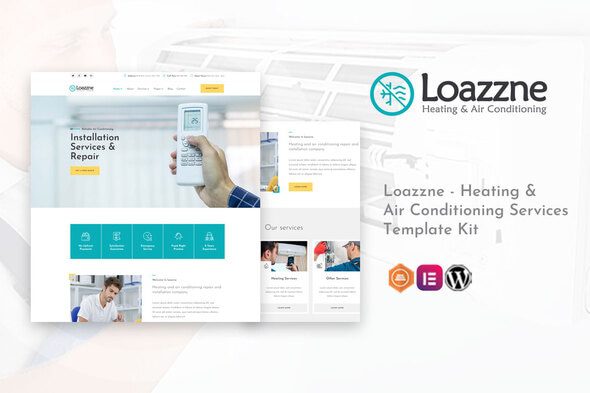
Loazzne – Heating & Air Conditioning Services Template Kit
Verified
See scan report
1 Year
Updates
Verified file
Check whether a dated scan report is linked for this file. A scan cannot guarantee safety.
Analyzed with 67 engines · 0 threats detected
File: loazzne-heating-air-conditioning-services-template.zip (585.6 KB)
SHA-256
df0cbeafbcbe92b32ab5237a42f2715d4e9973bd0068bb7bab34bdbb00d33ddc
Loazzne is a modern & professional Template Kit for air conditioning, cooling/heating, HVAC and ventilation services. It is also very good for any other home repair, services and maintenance businesses. After importing the demo, you just need to change some information on the template to have a complete website. It is optimized for seo very well. All of the copyrighted images you can use for your website. You are looking for a WordPress conditioning website, or a cooling/heating, HVAC, this is the best choice
Required Plugins :
- Elementor (Free)
- Themesflat Addons For Elementor (Free) (By Themesflat )
- MetForm
Kit Key Features:
- One Click Demo Import
- Includes 2 Home versions
- Shop Pages Include.
- Unique and Modern Style.
- Super Clear and Clean Layout
- Free PSD File After Purchased
- Lifetime Free Updates
- 24/7 Customer Support
- Cross browser compatible
- Built-in Header Footer
- Support Post Widget
- Support Carousel Slide Box ( Create sliders with anything )
- Ultra Responsive and Retina Ready
- Compatible with most WordPress themes
- Optimized for search engines
How to Install:
- Install the plugin from Plugins > Add New by searching for Template Kit Import. If you use FTP to install plugins, you can download it from
https://wordpress.org/plugins/template-kit-import
- Once the plugin is activated, go to Tools > Template Kit

- Click on Upload Template Kit ZIP File to browse to your zip file and import.
- Your Template Kit preview will appear. Click View Installed Kit:
- An orange banner will appear if your kit requires additional free plugins. Click Install Requirements for details.
- A popup will appear listing the plugins your kit needs installed or activated. Click Install Requirements to proceed.
- Now you may begin importing your templates by clicking the Import Template button on the desired template..
How to import Metform custom form
- Import metform template –
- Import the template where the form appears, then edit in Elementor. –
- Click the Metform widget in the column where the form should be and click Edit Form. –
- Select New, leave blank selected then click Edit Form button –
- Click ‘Add Template’ grey folder button. –
- Click ‘My Templates’ tab. –
- Choose your imported metform template, then click ‘Insert’.
- Once the template is loaded, click ‘Update’.
This Template Kit uses demo images from Envato Elements. You will need to license these images from Envato Elements to use them on your website, or you can substitute them with your own.
- https://elements.envato.com/image-Q7J2WJ6
- https://elements.envato.com/image-P8DW7ZH
- https://elements.envato.com/image-H4XLVGY
- https://elements.envato.com/image-PXQJA3V
- https://elements.envato.com/image-PYQKT3M
- https://elements.envato.com/image-3QUT76L
- https://elements.envato.com/image-FFX7DRY
- https://elements.envato.com/image-TSLHDVW
- https://elements.envato.com/image-LHC2VDY
- https://elements.envato.com/image-LXJ2NY9
- https://elements.envato.com/image-XUD8FWE
- https://elements.envato.com/image-PLXD3ZH
- https://elements.envato.com/image-VTFGD34
- https://elements.envato.com/image-PZP5ZXM
- https://elements.envato.com/image-DXPE22J
- https://elements.envato.com/image-CUZ5KG7
Frequently Asked Questions
Review the listed version, filename and any file-verification details provided before installing the file.
When a newer file is available, you can download it from your account during your access period. Check the version shown on the product page.
GPL-covered code can generally be used on multiple sites. Check separately licensed images, other assets and vendor services before use.
Check the license terms that apply to each product. WPTemplateKit is an independent redistribution service and does not include an official developer license or support.
Related Products


Wait! Become a member and download it all
Instead of paying 3.99 € for just this file, join the Club and download it — plus the entire catalog — with unlimited downloads while your membership is active.
Or try everything first with the 24-Hour Pass — 4.99 €
Special for you
Still thinking it over?
Take the 24-Hour Pass and try everything for just 4.99 €: this file and the entire catalog, with full member access for 24 hours. One-time payment — no subscription, nothing to cancel.
Try 24 hours for 4.99 €