Design and Customization
YITH Point of Sale for WooCommerce Premium (POS)

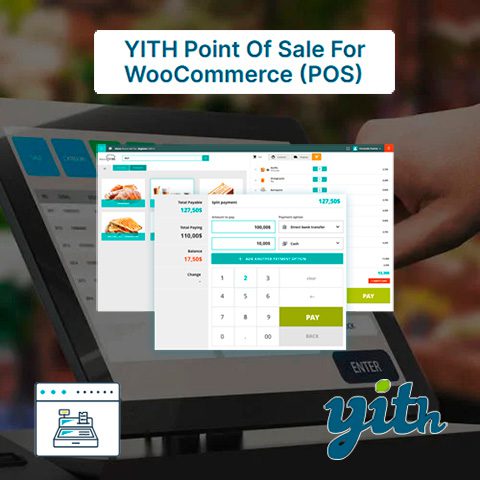
YITH Point of Sale for WooCommerce Premium (POS) turn your WooCommerce installation into a powerful and easy-to-use cash register for any type of store or business. With YITH Point of Sale for WooCommerce Premium (POS) you can:
- Synchronize your point of sale with orders, customers and product listings from your online store and vice versa. You will have full control over your order.
- Create a virtual cash register for any business or activity (store, bar, gym, etc.) without having to buy a physical cash register and save on the expensive annual subscription services of traditional point of sale tools and services.
- Use the virtual cash register on any computer, on touch screens and in any next-generation web browser, allowing you to use it on smart mobile phones (cell phones).
Features of YITH Point of Sale for WooCommerce Premium (POS)
Stores:
- Create a store in a few steps using the virtual assistant.
- For each store you can:
- Add billing information (store name and VAT number), address, contact details and social networks.
- Enable/disable the store.
- Add and enable/disable specific POS boxes.
- Check the status of the cash registers (open/closed) and the ATMs identified at all times.
- Customize receipts for multiple recipients.
- Inventory management at the product level for each store.
- Select one or more store managers and cashiers.
- Create new user accounts during store setup.
Boxes:
- Create as many POS boxes as you want.
- Enable/disable specific payment methods for each box.
- Show all products or only the products or categories selected for each box.
- Show all products together or by category.
- Enable barcode scanning of products.
- Assign specific ATMs.
- Enable receipt printing.
- Select a template for custom receipt.
- Enable the checkout report.
POS terminal display:
- Mobile Ready: Save the POS page to your device and open it like any other app.
- Box screen:
- Customize the login page.
- Upload a store logo that will be displayed on the login and checkout screens.
- Set discount keys.
- Customize the colors of the box screen.
- Search products by name, SKU and barcode.
- Activate the barcode scanner: simply scan the barcode to add products to the cart.
- Add new products from the checkout screen (if added by the manager they are also available for the future).
- Associate the order with an existing customer or create a new customer account from the checkout screen.
- Edit the customer’s billing and shipping information before completing the order.
- Freeze and save carts and add notes to them. You can recover them later to complete the purchase.
- Actions on the cart:
- Empty the current cart.
- Edit the price of any product in the cart.
- Add/edit notes to cart or any product in it.
- Discounts or surcharges apply.
- Apply coupon codes.
- Add shipping costs.
- Split Payment: Allows customers to pay with more than one payment method on the same order.
- Easy and intuitive payment screen, including total, quantity delivered and quantity to be returned.
- Full screen option.
- Enable/disable product sound added to cart.
- Checkout: View all store orders sorted by date and filterable by checkout. You can view the order details and reprint the receipt.
- View revenue from each POS box, including session time, ATMs identified during the session, total cash collected, and total sales by payment method.
- Close the cashier and download the cashier report with details of the day’s income and additional notes. Cashier statistics: time from login, number of orders created, total sales, report download.
Control panel and statistics:
- Control panel integrated into WooCommerce Admin where you can:
- Show statistics by custom date range.
- Filter orders and sales by store.
- Filter orders and sales by POS box.
- Show total number of orders, net total, average order value, average products per order, number of products sold, new users, loyal buyers, coupons used.
- Compare the data with the previous period or with the previous year.
- Show sales reports by day, week or month.
- Shows sales using a bar or line chart.
- Shows income by payment method.
- Shows cashier income.
- Filter orders by «created via POS box» or «created online».
- Shows in order details: store, POS box, cashier and payment methods used.
Technical details:
- Integrated with YITH WooCommerce Barcodes and QR Codes.
- Compatible with WPML and Loco Translate for multilingual websites.
- Prepared for translations.
- Including translations into Spanish, English, French, Italian and Dutch.
Frequently Asked Questions
Yes. All files are 100% original, unmodified and obtained directly from the developer. We never include ads, viruses or hidden code.
We update products daily. Simply re-download the file from your account to get the latest version at no extra cost during your license period.
Yes. Under the GPL license you can use the product on unlimited websites, yours and your clients'.
Absolutely. WordPress and its derivatives are released under the GNU GPL license, which allows redistribution. You are paying for the service of providing verified, updated files.
Wait! Become a member and download it all
Instead of paying 3.99 € for just this file, join the Club and download it — plus the entire catalog — with unlimited downloads while your membership is active.
Still thinking it over?
Take the 24-Hour Pass and try everything for just $3: this file and the entire catalog, with full member access for 24 hours. One-time payment — no subscription, nothing to cancel.
Try 24 hours for $3