
 Corporate
VAUSS – Portfolio and Personal Services
Verified
See scan report
1 Year
Updates
Verified file
Check whether a dated scan report is linked for this file. A scan cannot guarantee safety.
Analyzed with 63 engines · 0 threats detected
File: vauss-portfolio-and-personal-services-2022-02-21-23-52-52-utc.zip (3.4 MB)
SHA-256
4c76971d9d4a4554bc442ffc53e0740e5efc378543d968cd685418778171eeba
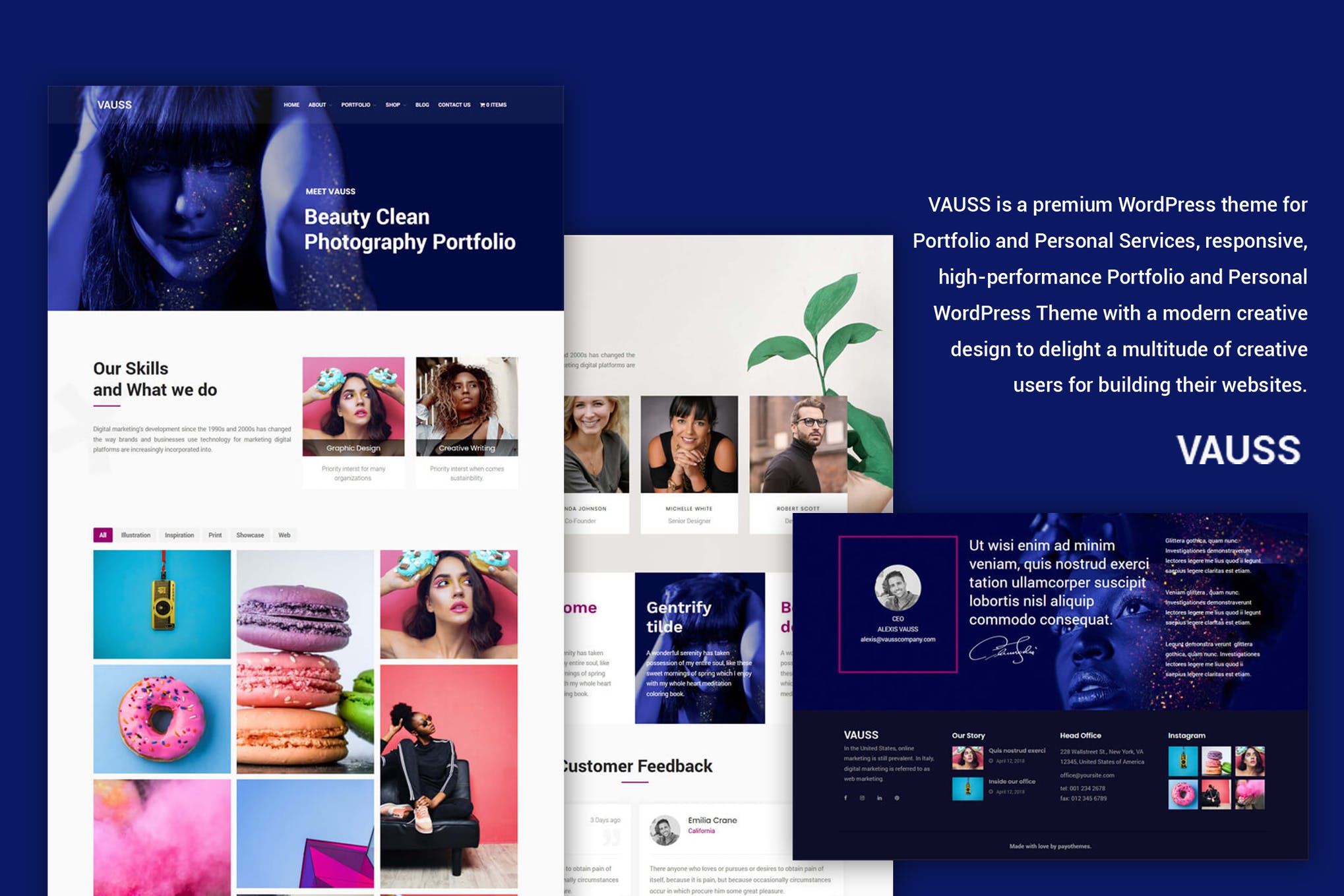
VAUSS is a premium WordPress theme for Portfolio and Personal Services, responsive, high-performance Portfolio and Personal WordPress Theme with a modern creative design to delight a multitude of creative users for building their websites.
Based on LayersWp and SiteOrigin builder, VAUSS is by far a multi-purpose and responsive theme allowing you to set up your own web page without painfulness with its outstanding feature such as varied header with 5+ styles, drag & drop Page Builder, speed & SEO optimized, custom css, widgets customised, WooCommerce ready. We also inlcuded in pack Import file, slider for import, SiteOrigin pages, widgets as text (just copy paste in sidebar).
VAUSS for WordPress delivers everything to cover your ambitions & creative needs. Not convinced? Take it for a spin and check out some of the amazing demos!
Ecommerce – WooCommerce You can build amazing shops with our theme, with great design and awesome features from WooCommerce. You can have your shop in minutes ! Just install, add your products and you are done !
Demo Import In our pack (zip downloaded from your account) you can find XML Import file and you can import all using WordPress Import tool plugin, also you can find all pages that you can import in page builder, Slider import and many more !
Features
- LayersWp for Elementor
- WooCommerce
- Responsive
- SiteOrigin builder
- Fast loading
- Google font
- Background parallax
- Background fixed
- One page & Multipages
Special thanks for:
- Pexels
- Visual portfolio
- SiteOrigin as page builder
- LayersWp for Elementor
Important: VAUSS is child theme for Layerswp, so you need to install free layerswp , and then install and activate our theme. If you don’t know how to install our template, please read our documentation (documentation you can find it in downloaded pack) in section Installation. Also, if you have questions, please ask us.
- Install WordPress
- Download Layers for Elementor https://www.layerswp.com/#download , install as theme and skip setup.
- Go to WordPress Appearance – Themes and upload VAUSS theme (install/activate theme), after activate VAUSS theme, in left side, under menu, you will need to install and activate all plugins that comes with our theme.
- If you have problems with theme installation, you can unzip it, and folder VAUSS add it using ftp in wp-content/themes
- Activate VAUSS WordPress theme
- Install plugins/enable what you need for your site.
- Go to WordPress Appearance – Customizer and add logo, choose header type, choose layout full width and other config options and save.
- Create your menu and, add your pages, set to primary and save.
- Customise your theme.
- Go to Livemesh Widget – settings, in first tab scroll down and Activate all plugin widgets
- For demo check folder Import.
Frequently Asked Questions
Review the listed version, filename and any file-verification details provided before installing the file.
When a newer file is available, you can download it from your account during your access period. Check the version shown on the product page.
GPL-covered code can generally be used on multiple sites. Check separately licensed images, other assets and vendor services before use.
Check the license terms that apply to each product. WPTemplateKit is an independent redistribution service and does not include an official developer license or support.
Related Products



Wait! Become a member and download it all
Instead of paying 3.99 € for just this file, join the Club and download it — plus the entire catalog — with unlimited downloads while your membership is active.
Or try everything first with the 24-Hour Pass — 4.99 €
Special for you
Still thinking it over?
Take the 24-Hour Pass and try everything for just 4.99 €: this file and the entire catalog, with full member access for 24 hours. One-time payment — no subscription, nothing to cancel.
Try 24 hours for 4.99 €