
 Health Medical
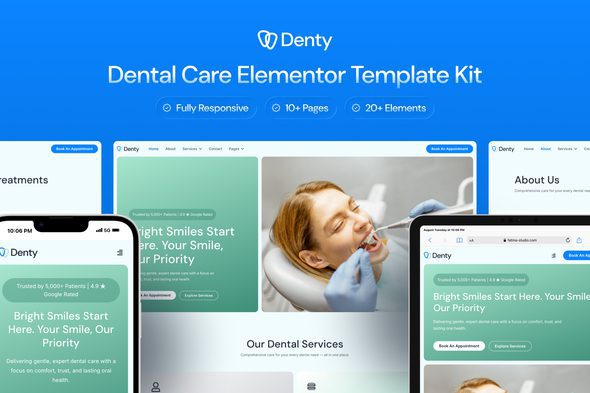
Denty – Dental Care Elementor Template Kit
Verified
See scan report
1 Year
Updates
Verified file
Check whether a dated scan report is linked for this file. A scan cannot guarantee safety.
Analyzed with 65 engines · 0 threats detected
File: denty-dental-care-elementor-template-kit-2025-08-14-13-35-24-utc.zip (4.8 MB)
SHA-256
15fa0a33c8109be89d8e39d9ca48be6a9ebabc99a38cb8cad2bd59798f9d7f21
Denty is a clean and calming Elementor template kit designed specifically for dental clinics, orthodontists, and cosmetic dentistry practices. With a modern yet clinical look, this kit builds trust, improves patient engagement, and simplifies appointment booking.
Perfect for practices that want a professional online presence without overwhelming visuals, Denty’s design focuses on clarity, accessibility, and patient comfort—making it easy to showcase services, share testimonials, and connect with patients.
Features
- Calm & Professional Design Language
- Optimized for Dental Clinics and Orthodontists
- Fully Customizable with Elementor Free
- Patient-Friendly Layouts with Clear Calls-to-Action
- Appointment Forms Built with MetForm
Templates Included
- Home
- About Us
- Services
- Appointment
- Gallery
- Testimonials
- Blog
- Single Post
- Contact
- Pricing
- 404 Page
- Header
- Footer
- Appointment Form
- Newsletter Form
Required Plugins
- Elementor
- ElementsKit Lite
- Jeg Elementor Kit
- Metform
- Sticky Header Effects for Elementor
How to Use Template Kits: This is not a WordPress Theme. Template kits contain the design data for Elementor only and are installed using the envato Elements plugin for WordPress or directly through Elementor.
Elementor Template Kits use the Envato Elements plugin to install.
Detailed Guide:
For further support, go to Elementor > Get Help in WordPress menu.
How to setup header in Jeg Elementor Kit plugin If you have Elementor Pro, setup headers and footers in Theme Builder. Pages you create with Elementor must have the Page Layout set to Elementor Full width for the global header and footer to appear.
- Go to Jeg Elementor Kit menu item > Header Template
- Click Add New Header
- Add condition > All Site and click Create
- Click the pencil icon to Edit and elementor will appear
- Click gray folder icon to access My Templates tab
- Insert the header template.
- Customize and Save.
Importing MetForms
- Import MetForm blocks.
- Edit page template, click MetForm widget → Edit Form.
- Choose New → Edit → Click folder icon.
- Select imported form → Update → Update again.
Image Collection
This Template Kit uses demo images from Envato Elements. You will need to license these images from Envato Elements to use them on your website, or you can substitute them with your own. Blog Content is not included – you will need to add a few posts to WordPress before post content will appear in templates.
Frequently Asked Questions
Review the listed version, filename and any file-verification details provided before installing the file.
When a newer file is available, you can download it from your account during your access period. Check the version shown on the product page.
GPL-covered code can generally be used on multiple sites. Check separately licensed images, other assets and vendor services before use.
Check the license terms that apply to each product. WPTemplateKit is an independent redistribution service and does not include an official developer license or support.
Related Products

Wait! Become a member and download it all
Instead of paying 3.99 € for just this file, join the Club and download it — plus the entire catalog — with unlimited downloads while your membership is active.
Or try everything first with the 24-Hour Pass — 4.99 €
Special for you
Still thinking it over?
Take the 24-Hour Pass and try everything for just 4.99 €: this file and the entire catalog, with full member access for 24 hours. One-time payment — no subscription, nothing to cancel.
Try 24 hours for 4.99 €