
 Business Services
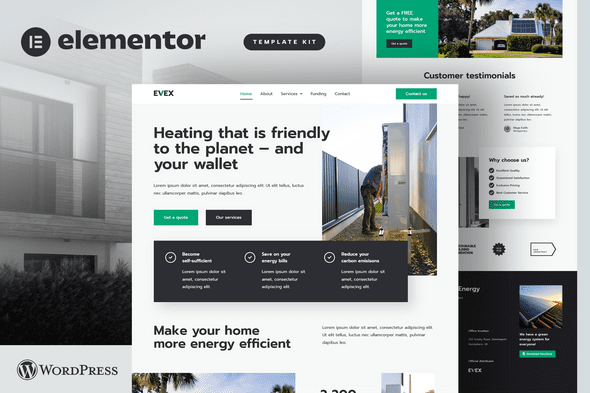
Evex – Heat Pumps & Renewable Energy Elementor Template Kit
Verified
See scan report
1 Year
Updates
Verified file
Check whether a dated scan report is linked for this file. A scan cannot guarantee safety.
Analyzed with 67 engines · 0 threats detected
File: evex-heat-pumps-renewable-energy-elementor-1.zip (953.4 KB)
SHA-256
4a98e8253366225a718204bd40f3fb377cc24e430916423d7be512a968df9e6f
Evex brings you a responsive, modern, yet timeless design. No more wasting your time on constant website updates, difficult editing, or costly web design or development services.
Evex simply works. Hassle-free and does not require any upgrades / additional costs.
Evex is an Elementor Template Kit for quickly and easily creating websites for your business using the Elementor Page Builder plugin for WordPress. This is not a WordPress theme. Template Kits contain page content for Elementor page builder. This kit has been optimized for use with the free Hello Elementor theme but may be used with most themes that support Elementor.
Perfect for content-rich websites
Effective content presentation is of paramount importance in delivering customer satisfaction and building sales. Evex brings visual hierarchy, smart content organization, and easy (desktop and mobile) navigation in order to not only increase the overall user experience but also to help you boost your search engine rankings without much effort.
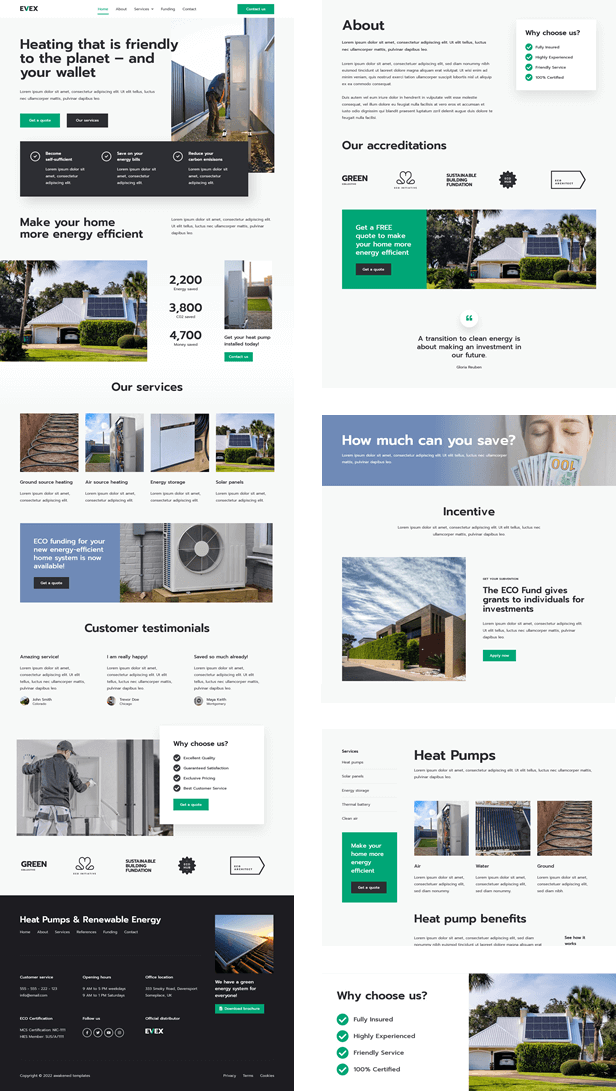
Page Templates
- Home
- About
- Contact
- FAQ
- Funding
- References
- Services
- Single Service
- Style Guide
- Header
- Footer
Required Plugins (included)
- Elementor
- Elementor Header & Footer Builder
- Metform
How to Use Template Kits:
- Install and Activate the “Envato Elements” plugin from Plugins > Add New in WordPress
- Download your kit file and Do not unzip
- Go to Elements > Installed Kits and click the Upload Template Kit button. You may also import automatically by clicking Connect Account to link your Elements subscription, then import under Elements > Template Kits.
- Check for the orange banner at the top and click Install Requirements to load any plugins the kit uses
- Click import on the Global Kit Styles first
- Click Import on one template at a time. These are stored in Elementor under Templates > Saved Templates.
- Go to Pages and create a new page and click Edit with Elementor
- Click the gear icon at lower-left of the builder to view page settings and choose Elementor Full Width and hide page title
- Click the gray folder icon to access My Templates tab and then Import the page you’d like to customize.
For further support, go to Elementor > Get Help in WordPress menu.
How to Import Metforms
- Create a new page with the template containing the form
- Right click the builder area to enable the Navigator
- Expand the sections to locate the Metform widget and click on it
- Click Edit on the left panel
- Create a new form or add any of the existing blocks. This will open a new editor to complete customization. When you click Update, the form will be added to the page.
This Template Kit uses demo images from Envato Elements. You will need to license these images from Envato Elements to use them on your website, or you can substitute them with your own.
Download images here: https://elements.envato.com/collections/DFMPW683B4
Changelog
Version 1.0.2 -21 Jan 25
- Converted to containers
Frequently Asked Questions
Review the listed version, filename and any file-verification details provided before installing the file.
When a newer file is available, you can download it from your account during your access period. Check the version shown on the product page.
GPL-covered code can generally be used on multiple sites. Check separately licensed images, other assets and vendor services before use.
Check the license terms that apply to each product. WPTemplateKit is an independent redistribution service and does not include an official developer license or support.
Related Products



Wait! Become a member and download it all
Instead of paying 3.99 € for just this file, join the Club and download it — plus the entire catalog — with unlimited downloads while your membership is active.
Or try everything first with the 24-Hour Pass — 4.99 €
Special for you
Still thinking it over?
Take the 24-Hour Pass and try everything for just 4.99 €: this file and the entire catalog, with full member access for 24 hours. One-time payment — no subscription, nothing to cancel.
Try 24 hours for 4.99 €