
 Travel Accomodation
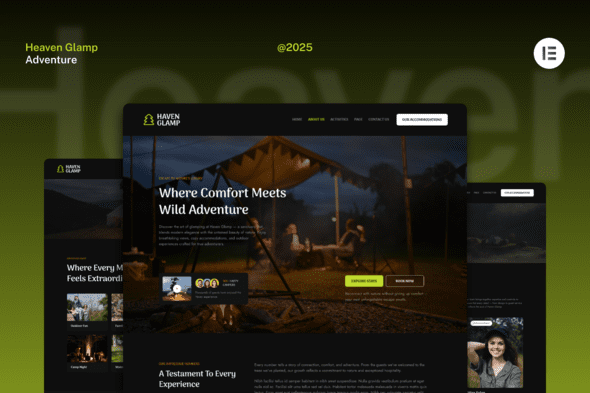
Haven Glamp – Dark Luxury Adventure Elementor Template Kit
1 Year
Updates
Haven Glamp is a Dark Luxury Glamping and Adventure Website Template Kit designed for Elementor. Perfect for luxury camping, eco-resorts, and outdoor retreat websites, this kit blends modern design with a natural adventure aesthetic. Featuring elegant layouts, immersive visuals, and seamless functionality, it helps showcase accommodations, experiences, and nature-inspired stories beautifully. Ideal for glamping sites, adventure tours, and boutique eco-lodges, Haven Glamp ensures your visitors feel the warmth of nature and premium comfort. Fully customizable and responsive, it’s ready to launch your next outdoor hospitality brand with style and sophistication.
Features
- True no-code customization with drag and drop visual builder
- Customize fonts and colors in one place or fine-tune on individual elements
- Modern, professional design
- Fast-loading
- Works with most Elementor themes.
Included Pages:
- Homepage
- About Us
- Activities
- Activity Details
- Accommodations
- Accommodation Details
- Team
- Help Center
- 404
- Contact Us
Plugins installed with kit
- Elementor
- Ultimate Addons for Elementor Lite
- The Plus Addons
How to Use Template Kits:
This is not a WordPress Theme. Template kits contain the design data for Elementor only and are installed using the envato Template Kit Import plugin for WordPress or directly through Elementor.
Detailed Guide:
For further support, go to Elementor > Get Help in WordPress menu.
Setup Header in ElementsKit Lite If you have Elementor Pro, setup headers and footers in Theme Builder. Pages you create with Elementor must have the Page Layout set to Elementor Full width for the global header and footer to appear.
- Go to ElementsKit > Header Footer
- If prompted to go through the wizard, click Next all the way through and then return to step 1 (you are not required to enter your email address or share your information)
- Click Add New Template button at the top
- Name your template, then toggle “Activate/Deactivate:” to On
- Click the gray Edit Content button. Elementor will open.
- Click the gray folder icon to access My Templates tab and Insert the header or footer template.
- Customize and Publish
Images This Template Kit uses demo images from Envato Elements. You will need to license these images from Envato Elements to use them on your website, or you can substitute them with your own.
Frequently Asked Questions
Review the listed version, filename and any file-verification details provided before installing the file.
When a newer file is available, you can download it from your account during your access period. Check the version shown on the product page.
GPL-covered code can generally be used on multiple sites. Check separately licensed images, other assets and vendor services before use.
Check the license terms that apply to each product. WPTemplateKit is an independent redistribution service and does not include an official developer license or support.
Related Products
Wait! Become a member and download it all
Instead of paying 3.99 € for just this file, join the Club and download it — plus the entire catalog — with unlimited downloads while your membership is active.
Or try everything first with the 24-Hour Pass — 4.99 €
Special for you
Still thinking it over?
Take the 24-Hour Pass and try everything for just 4.99 €: this file and the entire catalog, with full member access for 24 hours. One-time payment — no subscription, nothing to cancel.
Try 24 hours for 4.99 €