
 Events Entertainment
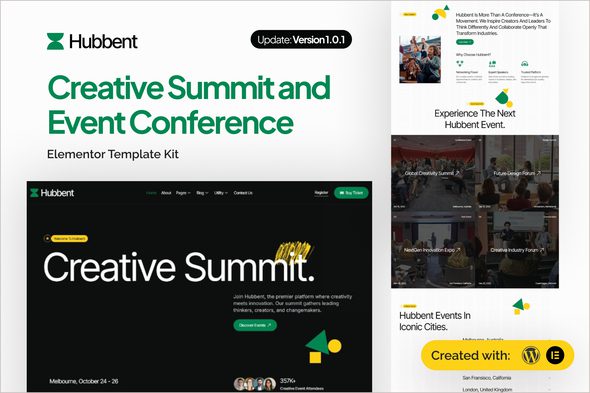
Hubbent – Creative Summit & Event Conference Elementor Template Kit
1 Year
Updates
“Hubbent” – your complete website solution for Creative Summits and Event Conferences created with Elementor and WordPress.
Built for organizers, agencies, and brands hosting high-impact events, Hubbent pairs the power of Elementor and WordPress to help you launch a polished, conversion-driven website without writing code. From speaker showcases and multi-day agendas to sponsor tiers and registration CTAs, this template kit streamlines everything you need to promote your conference, engage attendees, and drive sign-ups. Elementor’s intuitive drag-and-drop builder makes customization effortless, while WordPress ensures reliable content management and easy updates for fast-moving event teams.
Engineered for performance and clarity, Hubbent features clean typography for optimal readability, a design system for consistent branding, and lead-generation-optimized layouts that guide visitors toward key actions like ticket purchase, newsletter opt-ins, or workshop registration. The kit is fully responsive with optimized breakpoints, so your pages look sharp across desktops, tablets, and mobile devices. One-click “Back to Top” navigation improves usability on long schedules and speaker lists, while extensive testing across major browsers and versions ensures a dependable, professional experience for every visitor.
With 21+ pre-designed pages, Hubbent accelerates your build from hero section to footer. Launch landing pages, agenda timelines, speaker biographies, sponsor grids, FAQs, venue and travel info, gallery highlights, and post-event recaps—all structured with best-practice UI patterns to increase engagement and conversions. Smart content sections, clear hierarchy, and purposeful spacing help your audience scan quickly, discover value, and take action—making Hubbent ideal for corporate conferences, creative festivals, startup summits, academic symposiums, and community events alike.
If you need a future-proof event website that’s easy to customize, fast to publish, and focused on results, Hubbent delivers. Enjoy a modern aesthetic driven by a robust design system, flexible Elementor widgets for rapid iteration, and WordPress for scalable content operations. Elevate your brand presence, boost registrations, and keep attendees informed before, during, and after the event with Hubbent—where clarity, conversion, and creativity meet.
Suitable For:
- Creative design conferences
- Community & nonprofit events
- Lifestyle expos
Features:
- Unique & Clean Design
- Modern design based on design system
- 21+ ready to use templates
- Unlimited colors
- More than 900 ready fonts
- Fully Responsive Layout
- Fully Customizable
- Click to Go To Top
- Cross Browser Compatibility: Chrome, Firefox, Safari, Opera
Templates Include:
- Global Theme Style
- Design Guideline
- Home
- About
- Register Form
- Partner Form
- Event Form
- Subscribe Form
- Subscribe Blog Form
- Contact Us
- Coming Soon
- 404
- Single Post
- Our Blog
- Awards
- Jobs
- FAQ
- Exhibitors
- Ticket & Registration
- Venue
- Sponsorship
- Speakers
- Events
- Contact Form
- Footer
- Header
Required Plugin (included):
- Elementor
- The Plus Add On
- ElementsKit Lite
- Gum Elementor Kit
- MetForm
How to Use Template Kits:
This is not a WordPress Theme. Template kits contain the design data for Elementor only and are installed using the envato Template Kit Import plugin for WordPress or directly through Elementor.
Detailed Guide:
For further support, go to Elementor > Get Help in WordPress menu.
How to Import MetForm Custom Form:
- While edititing a page where a form should appear, open the Elementor navigator to locate the Metform widget.
- Click Edit Form in the builder panel.
- Select New, leave blank selected then click Edit Form button.
- Click ‘Add Template’ grey folder button.
- Click ‘My Templates’ tab.
- Choose your imported MetForm template, then click ‘Insert’.
- Once the template is loaded, click ‘Update’.
Setup Header in ElementsKit Lite If you have Elementor Pro, setup headers and footers in Theme Builder. Pages you create with Elementor must have the Page Layout set to Elementor Full width for the global header and footer to appear.
- Go to ElementsKit > Header Footer
- If prompted to go through the wizard, click Next all the way through and then return to step 1 (you are not required to enter your email address or share your information)
- Click Add New Template button at the top
- Name your template, then toggle “Activate/Deactivate:” to On
- Click the gray Edit Content button. Elementor will open.
- Click the gray folder icon to access My Templates tab and Insert the header or footer template.
- Customize and Publish
IMPORTANT:
This Template Kit uses demo images from Envato Elements. You will need to license these images from Envato Elements to use them on your website, or you can substitute them with your own.
Frequently Asked Questions
Review the listed version, filename and any file-verification details provided before installing the file.
When a newer file is available, you can download it from your account during your access period. Check the version shown on the product page.
GPL-covered code can generally be used on multiple sites. Check separately licensed images, other assets and vendor services before use.
Check the license terms that apply to each product. WPTemplateKit is an independent redistribution service and does not include an official developer license or support.
Related Products
Wait! Become a member and download it all
Instead of paying 3.99 € for just this file, join the Club and download it — plus the entire catalog — with unlimited downloads while your membership is active.
Or try everything first with the 24-Hour Pass — 4.99 €
Special for you
Still thinking it over?
Take the 24-Hour Pass and try everything for just 4.99 €: this file and the entire catalog, with full member access for 24 hours. One-time payment — no subscription, nothing to cancel.
Try 24 hours for 4.99 €