
 Real Estate Construction
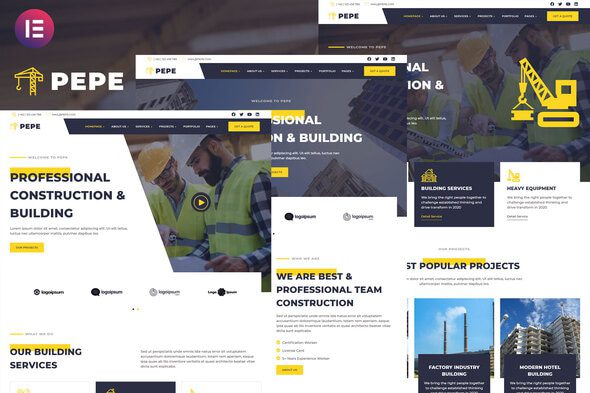
Pepe – Building & Construction Business Services Elementor Template Kit
1 Year
Updates
Pepe – Building & Construction Business Services Elementor Template Kit is a collection of layouts for the Elementor page builder WordPress plugin, designed for use with Elementor Free Version for a clean Design. It works with most themes and is optimized for use with the free Hello Elementor theme.
Elevate your website design with Pepe – Building & Construction Business Services Elementor Template Kit , a stunning and versatile Elementor Template Kit crafted for perfection. Whether you’re a creative professional, business owner, or freelancer, this kit offers a seamless and visually captivating solution for your online presence.
Construct a strong online presence with our Building & Construction Business Services Elementor Template Kit – an exclusive solution crafted for construction companies, contractors, and building services. Elevate your digital portfolio with this meticulously designed kit, tailored to showcase your construction projects, services, and industry expertise. Seamlessly customizable through Elementor, this kit ensures your website reflects the strength and reliability of your construction business. Crafted for optimal performance and SEO-friendly design, the ‘Building & Construction Business Services’ Elementor Template Kit is your blueprint for creating a visually stunning and impactful online presence in the competitive world of construction services. Transform your website effortlessly with this robust and professional template kit.
Key Features:
Modern and Sleek Design: Impress your visitors with a contemporary design that exudes professionalism. Pepe – Building & Construction Business Services Elementor Template Kit offers a clean and sleek layout, ensuring a delightful user experience.
Fully Responsive: Your website will look flawless on any device – from desktops to tablets and smartphones. Pepe – Building & Construction Business Services Elementor Template Kit is designed to adapt, providing a consistent and visually appealing experience across all platforms.
Easy Customization with Elementor: No coding skills required! Pepe – Building & Construction Business Services Elementor Template Kit is built with Elementor, making customization a breeze. Effortlessly modify the layout, colors, and content to suit your brand identity.
Versatile Sections: From eye-catching hero banners to engaging portfolio layouts, Pepe – Building & Construction Business Services Elementor Template Kit includes a variety of sections to showcase your content effectively. Impress your audience with compelling visuals and a user-friendly interface.
Optimized for Performance: Fast loading times are essential for user satisfaction and SEO. Rest assured, Pepe – Building & Construction Business Services Elementor Template Kit is optimized for speed, ensuring a smooth and efficient browsing experience.
Cross-Browser Compatibility: Reach a broader audience with a template kit that works seamlessly across various browsers. Your website will look great, no matter the browser your visitors use.
18 Pages Variation Templates Ready For Reusable :
- Home V1
- Home V2
- Home V3
- About Us
- Our Story
- Team Work
- Our Services
- Detail Service
- Our Projects
- Single Project
- Portfolio
- Testimonial
- Contact Us
- FAQ
- 404 Page
- Under Maintanence
- Blog
- Single Blog
Template Features
- No Pro Plugin Needed
- 3 Unique Home Variation
- True No Coding Required
- Global Theme Style
Required Plugins ( installed with kit)
- Elementor
- Elements Kit Lite
- Essential Addons for Elementor
- Header, Footer & Block For Elementor
- MetForm
- Happy Addon For Elementor
How to Install:
- Install and Activate the “Envato Elements” plugin from Plugins > Add New in WordPress
- Do not unzip
- Go to Elements > Installed Kits and click the Upload Template Kit button.
- Before importing a template, ensure the Install Requirements button is clicked to activate required plugins
- For best results, do not import more than one template at a time.
- Go to Pages and create a new page and click Edit with Elementor
- Click the gear icon at lower-left of the builder to view page settings and choose Elementor Full Width and hide page title
- Click the gray folder icon to access My Templates tab and then Import the page you’d like to customize
For further support, go to Elementor > Get Help in WordPress menu.
How to import Metforms Template
- Import metform
- Import the template where the form appears, then click View Template to load in the builder
- Right click the page to open Metform widgets
- Click New, leave blank selected then click Edit Form button
- Click ‘Add Template’ grey folder icon.
- Click ‘My Templates’ tab.
- Choose your imported metform template, then click ‘Insert’.
- Once the template is loaded, click ‘Update’.
How to import Header & Footer Builder
- Import Header/Footer
- Then Click Appereance > Header, Footer & Block
- Create Add New
- Type Off Template Chose Header / Footer
- Then Setting Display On Intire Site, Then Edit With Elementor
- Import Header / Footer From My Template, Then Publish
This Template Kit uses demo images from Envato Elements. You will need to license these images from Envato Elements to use them on your website, or you can substitute them with your own.
- https://elements.envato.com/image-X7TEUJL
- https://elements.envato.com/image-FTLJFW5
- https://elements.envato.com/image-TYEPD8V
- https://elements.envato.com/image-MQG7RAJ
- https://elements.envato.com/image-PSLDYNM
- https://elements.envato.com/image-H8EYM6F
- https://elements.envato.com/image-PZR36K3
- https://elements.envato.com/image-CE48FKN
- https://elements.envato.com/image-HDLJQCS
- https://elements.envato.com/image-PPSLV5U
Frequently Asked Questions
Review the listed version, filename and any file-verification details provided before installing the file.
When a newer file is available, you can download it from your account during your access period. Check the version shown on the product page.
GPL-covered code can generally be used on multiple sites. Check separately licensed images, other assets and vendor services before use.
Check the license terms that apply to each product. WPTemplateKit is an independent redistribution service and does not include an official developer license or support.
Related Products
Wait! Become a member and download it all
Instead of paying 3.99 € for just this file, join the Club and download it — plus the entire catalog — with unlimited downloads while your membership is active.
Or try everything first with the 24-Hour Pass — 4.99 €
Special for you
Still thinking it over?
Take the 24-Hour Pass and try everything for just 4.99 €: this file and the entire catalog, with full member access for 24 hours. One-time payment — no subscription, nothing to cancel.
Try 24 hours for 4.99 €