
 Creative Design
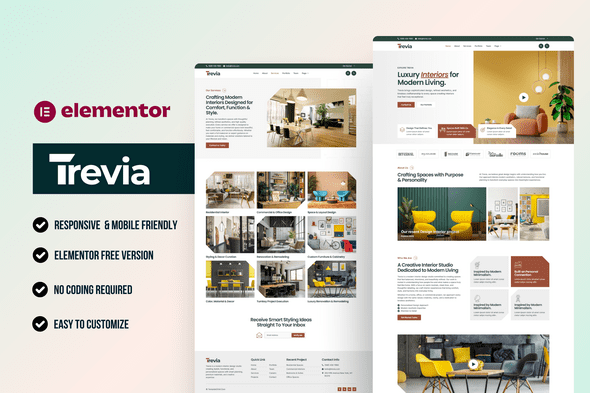
Trevia – Interior Design Elementor Template Kit
Verified
See scan report
1 Year
Updates
Verified file
Check whether a dated scan report is linked for this file. A scan cannot guarantee safety.
Analyzed with 68 engines · 0 threats detected
File: trevia-travel-agency-elementor-template-kit-1.zip (1.5 MB)
SHA-256
25b039891e48c76381959140f968e46c5ad39b28da2993f61d677624235a5c15
Trevia is a stylish and modern Elementor Template Kit crafted for interior designers, architecture firms, home décor studios, renovation agencies, and creative design professionals. With elegant layouts, clean aesthetics, and premium visual structure, Trevia helps you showcase projects, services, design philosophy, team members, career opportunities, and client inquiries in a professional and visually compelling way.
Built entirely with Elementor’s drag-and-drop editor, Trevia is fully customizable, responsive, and SEO-optimized. Whether you’re building a design studio portfolio or promoting your interior design services, this kit ensures a high-end, polished online presence without writing a single line of code.
Why Choose Trevia?
- Perfect for interior designers, architects, and home décor studios
- Elegantly designed, project-focused, and visually captivating layout
- Includes career form, contact form, and newsletter form
- Built for speed, mobile-responsive, and SEO-friendly
- 100% customizable with Elementor — no coding needed
Required Plugins:
- Elementor
- MetForm
- Jeg Elementor Kit
- Gum Addon for Elementor
- ElementsKit Lite
What’s Included in the Zip:
- Home Page
- About Page
- Service Page
- Services Details Page
- Team Page
- Portfolio Page
- Careers Page
- Blog Archive
- Single Post
- Contact Page
- 404 Page
- Coming Soon Page
- Contact Form
- Careers Form
- Newsletter Form
- Header
- Footer
This is not a WordPress Theme. Template Kits contain design templates for Elementor and can be imported using the Envato Elements plugin or directly within Elementor.
How to Import MetForm Custom Form:
- Import all MetForm templates first.
- Open the page where the form is placed and click “Edit with Elementor”.
- Select the MetForm widget and click Edit Form.
- Choose “New”, leave it empty, and click Edit Form again.
- Click the gray folder icon → open “My Templates” → select the imported MetForm template → Insert.
- Click Update to save your form.
How to Setup Header in Jeg Elementor Kit Plugin:
- If using Elementor Pro, you can manage your header via Theme Builder.
- If not, go to Jeg Elementor Kit → Header Template.
- Click Add New Header → Add Condition → Entire Site → Create.
- Edit the header using the Elementor editor.
- Insert the header template via the gray folder icon.
- Customize and click Save.
Detailed Installation Guide:
Images:
This Template Kit uses demo images from Envato Elements. You must license these images from Envato Elements to use them on your website or replace them with your own.
Collection Link:
Frequently Asked Questions
Review the listed version, filename and any file-verification details provided before installing the file.
When a newer file is available, you can download it from your account during your access period. Check the version shown on the product page.
GPL-covered code can generally be used on multiple sites. Check separately licensed images, other assets and vendor services before use.
Check the license terms that apply to each product. WPTemplateKit is an independent redistribution service and does not include an official developer license or support.
Related Products

Wait! Become a member and download it all
Instead of paying 3.99 € for just this file, join the Club and download it — plus the entire catalog — with unlimited downloads while your membership is active.
Or try everything first with the 24-Hour Pass — 4.99 €
Special for you
Still thinking it over?
Take the 24-Hour Pass and try everything for just 4.99 €: this file and the entire catalog, with full member access for 24 hours. One-time payment — no subscription, nothing to cancel.
Try 24 hours for 4.99 €