
 eCommerce
Version: 3.0.6
WooCommerce Advanced Quantity
Verified
See scan report
1 Year
Updates
Verified file
Check whether a dated scan report is linked for this file. A scan cannot guarantee safety.
Analyzed with 63 engines · 0 threats detected
File: woo-advanced-qty_3.0.6.zip (133.0 KB)
SHA-256
16c467bd70040a157cc39da70ed0c6f9f628287b893f4d365adc44fe54c26bdc
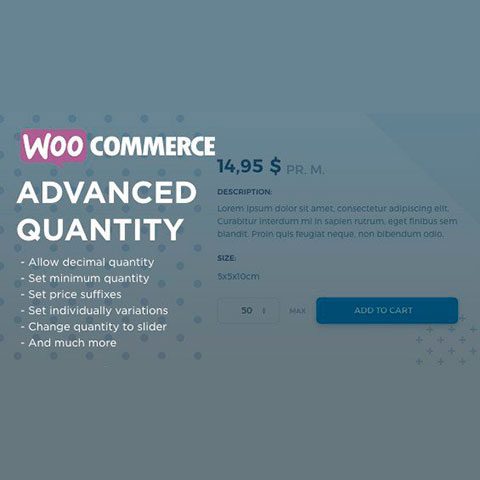
WooCommerce Advanced Quantity it gives you control over how the product quantity field works, allowing you to change the minimum value, set a maximum value, or change the interval between steps. In this way WooCommerce Advanced Quantity it gives you full control over the quantity of each product a customer can purchase.
WooCommerce Advanced Quantity it allows customers to enter decimal quantities in the product quantity, ideal for stores that sell products according to weight, length, etc., such as textile or food stores, for example. With WooCommerce Advanced Quantity you can even allow only halves: 0.5, 1, 1.5, 2, 2.5…
Thanks to the fact that you can control the interval between steps, WooCommerce Advanced Quantity it also allows you to sell products in batches of fixed quantities, for example by dozens, five by five, etc.
Features of WooCommerce Advanced Quantity
- Allows you to control the way the quantity field of the products behaves
- Allows you to purchase decimal quantities of product
- Establishes an interval between steps in the quantity change, without allowing intermediate quantities
- Establish a minimum purchase quantity per product
- Establishes a maximum number of units that can be purchased of a product
- Sets a standard default quantity, which will be displayed in the quantity field (instead of «1»)
- Sets a suffix for the price (for example, «per Kg»)
- Compatible with WPML for multilingual websites
Frequently Asked Questions
Review the listed version, filename and any file-verification details provided before installing the file.
When a newer file is available, you can download it from your account during your access period. Check the version shown on the product page.
GPL-covered code can generally be used on multiple sites. Check separately licensed images, other assets and vendor services before use.
Check the license terms that apply to each product. WPTemplateKit is an independent redistribution service and does not include an official developer license or support.
Related Products

Wait! Become a member and download it all
Instead of paying 3.99 € for just this file, join the Club and download it — plus the entire catalog — with unlimited downloads while your membership is active.
Or try everything first with the 24-Hour Pass — 4.99 €
Special for you
Still thinking it over?
Take the 24-Hour Pass and try everything for just 4.99 €: this file and the entire catalog, with full member access for 24 hours. One-time payment — no subscription, nothing to cancel.
Try 24 hours for 4.99 €