YITH Point of Sale for WooCommerce Premium (POS)

in ,

Choose Your Desired Option(s)

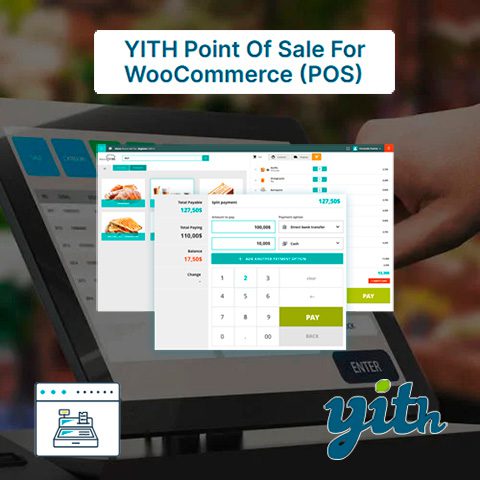
YITH Point of Sale for WooCommerce Premium (POS) turn your WooCommerce installation into a powerful and easy-to-use cash register for any type of store or business. With YITH Point of Sale for WooCommerce Premium (POS) you can:

  • Synchronize your point of sale with orders, customers and product listings from your online store and vice versa. You will have full control over your order.
  • Create a virtual cash register for any business or activity (store, bar, gym, etc.) without having to buy a physical cash register and save on the expensive annual subscription services of traditional point of sale tools and services.
  • Use the virtual cash register on any computer, on touch screens and in any next-generation web browser, allowing you to use it on smart mobile phones (cell phones).

Features of YITH Point of Sale for WooCommerce Premium (POS)

Stores:

  • Create a store in a few steps using the virtual assistant.
  • For each store you can:
    • Add billing information (store name and VAT number), address, contact details and social networks.
    • Enable/disable the store.
    • Add and enable/disable specific POS boxes.
    • Check the status of the cash registers (open/closed) and the ATMs identified at all times.
    • Customize receipts for multiple recipients.
    • Inventory management at the product level for each store.
    • Select one or more store managers and cashiers.
    • Create new user accounts during store setup.

Boxes:

  • Create as many POS boxes as you want.
  • Enable/disable specific payment methods for each box.
  • Show all products or only the products or categories selected for each box.
  • Show all products together or by category.
  • Enable barcode scanning of products.
  • Assign specific ATMs.
  • Enable receipt printing.
  • Select a template for custom receipt.
  • Enable the checkout report.

POS terminal display:

  • Mobile Ready: Save the POS page to your device and open it like any other app.
  • Box screen:
    • Customize the login page.
    • Upload a store logo that will be displayed on the login and checkout screens.
    • Set discount keys.
    • Customize the colors of the box screen.
    • Search products by name, SKU and barcode.
    • Activate the barcode scanner: simply scan the barcode to add products to the cart.
    • Add new products from the checkout screen (if added by the manager they are also available for the future).
    • Associate the order with an existing customer or create a new customer account from the checkout screen.
    • Edit the customer’s billing and shipping information before completing the order.
    • Freeze and save carts and add notes to them. You can recover them later to complete the purchase.
    • Actions on the cart:
      • Empty the current cart.
      • Edit the price of any product in the cart.
      • Add/edit notes to cart or any product in it.
      • Discounts or surcharges apply.
      • Apply coupon codes.
      • Add shipping costs.
    • Split Payment: Allows customers to pay with more than one payment method on the same order.
    • Easy and intuitive payment screen, including total, quantity delivered and quantity to be returned.
    • Full screen option.
    • Enable/disable product sound added to cart.
  • Checkout: View all store orders sorted by date and filterable by checkout. You can view the order details and reprint the receipt.
  • View revenue from each POS box, including session time, ATMs identified during the session, total cash collected, and total sales by payment method.
  • Close the cashier and download the cashier report with details of the day’s income and additional notes. Cashier statistics: time from login, number of orders created, total sales, report download.

Control panel and statistics:

  • Control panel integrated into WooCommerce Admin where you can:
    • Show statistics by custom date range.
    • Filter orders and sales by store.
    • Filter orders and sales by POS box.
    • Show total number of orders, net total, average order value, average products per order, number of products sold, new users, loyal buyers, coupons used.
    • Compare the data with the previous period or with the previous year.
    • Show sales reports by day, week or month.
    • Shows sales using a bar or line chart.
    • Shows income by payment method.
    • Shows cashier income.
  • Filter orders by «created via POS box» or «created online».
  • Shows in order details: store, POS box, cashier and payment methods used.

Technical details:

  • Integrated with YITH WooCommerce Barcodes and QR Codes.
  • Compatible with WPML and Loco Translate for multilingual websites.
  • Prepared for translations.
  • Including translations into Spanish, English, French, Italian and Dutch.

0 Sale

Share Now!

👋 Subscribe to download this and any other template without limits

By subscribing you will get premium access and you can download this and any other template without limits from 16€/month or 49€ with unlimited access forever.

⚠️ Not working or outdated?

If the file you downloaded doesn’t work or you need a more up-to-date version, let us know and we’ll try to update this download as soon as possible.

✅ Clean and safe GPL plugins scanned with VirusTotal

All our files are analyzed by VirusTotal, guaranteeing that they are virus-free and completely safe.

Your'e ViewingYITH Point of Sale for WooCommerce Premium (POS)

3.00€

Share Your Valuable Opinions

Cart ( 0)

  • Your cart is empty.